Error handling is an integral skill that developers should be actively developing from the very beginning of their careers. Skillful error handling results in robust applications, and more enjoyable user/debugging sessions. While masterful error handling may not be immediately obvious to users and developers, poor error handling is a glaring sore thumb to everyone involved with the software. The three most common pitfalls of error handling in my experience are indescriptive/misleading error messages, confusing stack traces, and absent recovery logic.
An example of a good error message, is one in which it clearly states what went wrong in a user-friendly fashion. 'Form-A01 is expecting a true/false value for disability check input, but received "yes"'. In this example the user can clearly see they need to replace yes with true to solve their issue and proceed. While this may seem obvious, many users have run into the dreaded 'Something went wrong' error message. Not only is this type of error message unhelpful for users to help remedy their input behaviour, but now the developer is forced to go digging through log files and application logic to determine what exactly lead to the erroneous value.
'Something went wrong' is a poor error message, but it is still much better than silent or misleading errors. If you are catching an error, this should be, at minimum, logged for the developer to be able to review. If the error you are catching has even the slightest chance of causing unexpected results, the user should be notified so they may be able to review the actions they are performing to ensure they have done everything correctly.
Often silent or buried error messages can happen accidentally by being too generic in your error catching logic. The best safeguard to this is to always be as explicit as possible in the type of errors you are throwing and catching. If you know that writing to a file might throw an ENOENT error, only catch that type of error or you will be burying unexpected error types that may result in your function code. When the error message says 'The file could not be written as expected' but the actual error is a null value passed to a subexpression you might be left scratching your head.
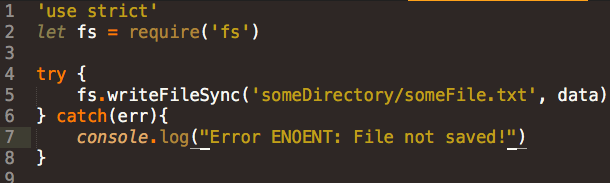
An example of poor error handling, developer is assuming only ENOENT is possible here...
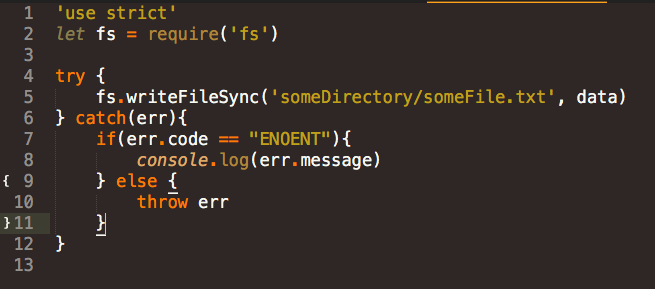
An example of better error handling, checks for expected error, re-throws otherwise.
The second common pitfall of error handling actually rests on the shoulders of the developers of programming language implementations. Each programming language has its own implementation of stack traces. Stack traces can be an extremely powerful debugging aid when implemented properly. Unfortunately, not all programming languages come standard with clean and powerful stack traces. The worse offenders have stack traces littered with low level function calls that do not reflect the function calls your application code is making and obfuscate exactly where the error is originating.
There is a time and place for detailed stack traces, but the end developer working on application logic should be only shown application logic function calls in the stack traces by default. The stack trace should be styled cleanly with an absence of confusing symbols or syntax ticks. The best implementations will go the extra mile in terms of making explicitly clear what function is being called and what parameters it was provided. This is often enough to immediately spot an unexpected value provided to a function and focus in on the problem code.
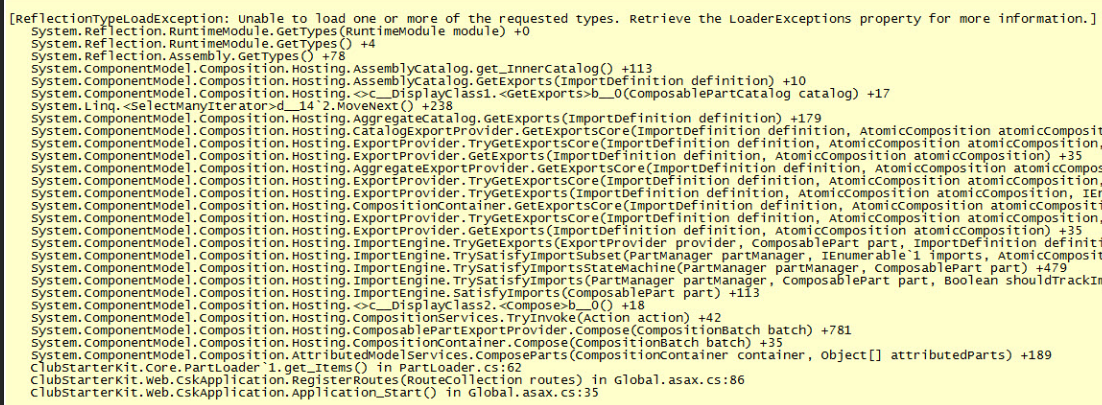
An example of an excessive and confusing stack trace... sorry C#.
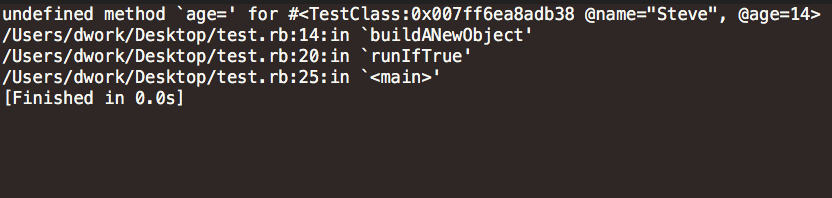
An example of a useful stack trace and error message.
The final common pitfall in error handling can often lead to the most disastrous effects. An absence of recovery logic, at minimum, ensures that if anything goes wrong within the application, either the software will be required to be restarted or the developer will have to correct some state to get the application working correctly. At worse, an absence of recovery logic can lead to undiagnosed bugs, erroneous data entry, and unexpected program behaviour resulting in costly production errors.
Application code by its very nature is brittle. It is explicitly told what to do, and if it runs into values it is not expecting, it will be confused on how to proceed or possibly use the value in unexpected ways. It is our job as developers to acknowledge that these situations can arise, and when they do, ensure our logic can respond elegantly. Often this can be as simple as notifying the user an action received an unexpected value and what it was expecting instead or provide a series of steps to help resolve the issue.
The worst possible course of action is allowing the program to save any partial state as a result of a failed function call. If your function has any side effects, or performs any work in your database, it should take responsibility for its parameters and check them carefully before proceeding. The alternative is to provide a clean-up routine on function failure but in my opinion it is better to not perform any work on state until the parameter inputs are determined to be in an acceptable state.
While I have listed several pitfalls for error handling, this post still only scratches the surface. Developers should take error handling very seriously as it can lead to more productive and enjoyable debug sessions as well as more robust programs and happier clients. Think critically of every try catch block, of stack traces, and of recovery routines. Be careful when using asynchronous code and promises and make sure you are bubbling up errors where required. A little dedication in this area can make your software much more enjoyable to work with and keep you productive.